How to See Which AI Crawlers Visit Your Site (and What They Read)
AI crawlers do not show up in Google Analytics. Most of them fetch your HTML and leave without running the tracking script, so the only place they are visible is your server or CDN log. This is how to read that log: which AI crawlers came, which pages each one requested, and whether the ones claiming to be OpenAI or Perplexity really were. Every command below was run before it was printed. The numbers are from the logs of pmax.online, our own agency's website: 10,183 AI crawler requests in 30 days, and of those we could check, one in four was fake.
By Philipp Enders·Founder, CrunchJunkie·LinkedInBuilds the reporting and AI-visibility tooling this analysis was run with.
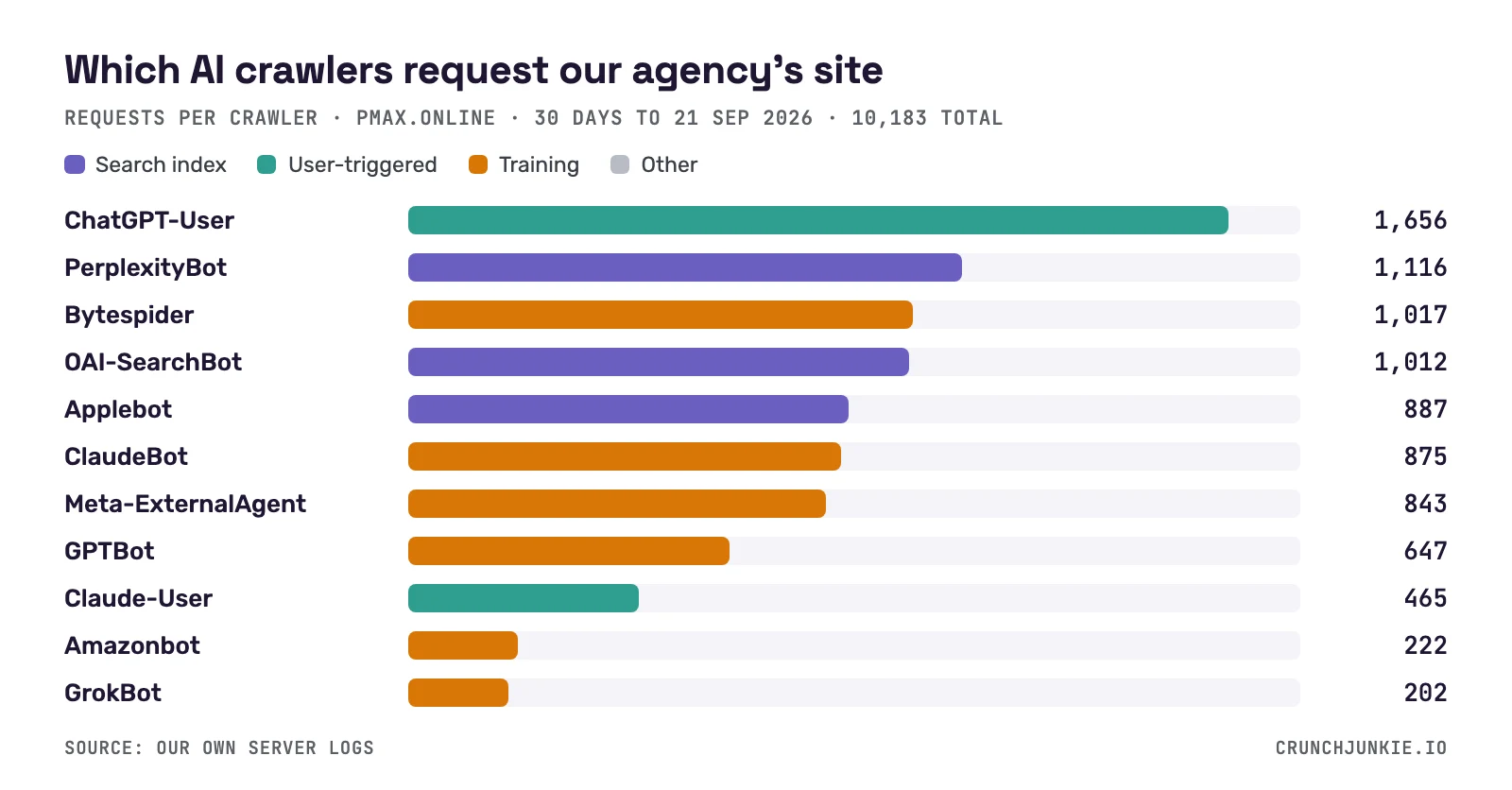
Requests per AI user agent on our agency's site over 30 days, 10,183 in total. The most active one is ChatGPT-User: ChatGPT fetching a page because a person just asked it something.
The short answer
Three steps. Count requests per AI user agent in your access log. For each crawler, list the URLs it requested and the status codes it got back. Then check the sending IP addresses against the ranges the operator publishes, because a user agent is a text field anyone can type. If you have no log files because you are on Cloudflare, Vercel or something similar, the same data comes from the platform's dashboard or a log export, covered further down.
What you get is a record of access: who asked for which page and what your server answered. What you do not get is what the model did with it. A request is not a citation, and we come back to that at the end.
Why analytics tools miss them
Google Analytics, Matomo and the rest count a visit when a script runs in a browser. Most AI crawlers request the HTML and stop there, and GA4 excludes known bots on top of that. So a site can take thousands of AI crawler requests a month and see none of them in its reports. pmax.online took 10,183 in the last 30 days.
The server sees all of it. Every request is a line in the access log with the IP address, the time, the URL, the status code and the user agent, and that line is written whether or not any script ran.
Step 1: count the AI crawlers in your access log
This assumes the combined log format, the default in nginx and Apache, where the user agent is the last quoted field. The command lower-cases the user agent, looks for a known AI crawler name and counts one per request.
The obvious version of this, grep -o piped into uniq -c, is wrong, and we only noticed because we tested it. Most AI user agents name the crawler twice, once as the product and once in the info URL (GPTBot/1.3; +https://openai.com/gptbot), so grep -o counts every request double. The awk version takes the first match per line.
One name in the list deserves a note. Google-Extended and Applebot-Extended are robots.txt tokens. Google and Apple never send them as user agents; the tokens only tell the two companies what they may do with pages their normal crawlers fetched. So if Google-Extended shows up in your log, it is someone pretending. On pmax.online it showed up 157 times in 30 days, and not one of those requests came from Google's address ranges.
Run on macOS against a combined-format log before publication. Replace access.log with your own path, for example /var/log/nginx/access.log. Rotated logs are usually gzipped; decompress them first.
Step 2: see what each crawler read
The first command under the table lists the URLs one crawler requested. It tells you what that crawler considers worth fetching on your site, which is often not what you would guess. On ours the second most-requested path was not one of our pages at all; more on that below.
The second command shows status codes per crawler, and the table shows what that looked like on pmax.online. 6,133 requests got a page. 1,368 got a 406 and 176 a 403: together 1,544, or 15.2%, were turned away by a firewall rule and not by the site, and 412 of those were aimed at crawlers that fetch pages for live answers. We cannot tell from this export how many of the blocked requests were the fake ones described further down, and a firewall that stops impostors is doing its job. How to tell the two apart is the subject of 11.6% of AI crawler fetches hit a firewall. robots.txt cannot cause a 403. It is a file the crawler reads and chooses to follow.
Status codes of all 10,183 AI crawler requests on pmax.online, 30 days to 21 September 2026.
Status
Meaning
Requests
200
Page served
6,133
406
Refused by a firewall rule
1,368
404
Not found
1,032
302
Temporary redirect
807
301
Permanent redirect
539
403
Refused by a firewall rule
176
520
Origin error reported by the CDN
58
409
Conflict
58
206, 304, 522
Other
12
Status codes of all 10,183 AI crawler requests on pmax.online, 30 days to 21 September 2026.
Both commands run on macOS against a combined-format log before publication. Swap oai-searchbot for any name from step 1.
No log files? Cloudflare, Vercel and shared hosting
On Cloudflare, AI Crawl Control shows requests per crawler and per path in the dashboard, and Logpush exports raw request logs if you want to run the commands above. Cloudflare sees the request before your server does, and that matters: a request Cloudflare blocks never reaches your own log.
On Vercel there is no access log file. Log drains forward every request to an endpoint you choose. The records are JSON, so the awk commands do not apply as they stand, but the fields are the same: path, status, user agent, client IP.
On shared hosting, look for raw access logs in the control panel. cPanel calls it Raw Access and gives you the same combined-format file the commands expect.
Step 3: check the crawler is who it says it is
A user agent is a header. Anyone can send GPTBot, and people do. The check is the IP address. OpenAI, Perplexity and Google publish the ranges their crawlers use as JSON, and a request from outside the range is not theirs. The table lists the files we have confirmed. The script under it reads one of them and tells you, for each address you pass in, whether it is inside. Google also documents a reverse DNS method.
On pmax.online, 4,661 of the 30 days' requests came under the names of operators whose ranges we could check. 3,429 were genuine and 1,232 were not. That is 26.4%, one in four. 654 claimed to be OpenAI, which is 20% of everything carrying an OpenAI user agent. 416 claimed to be Perplexity, 35% of its total. All 162 requests under a Google AI user agent were fake, 157 of them the Google-Extended agent that Google never sends.
What were they after? Our tool counts 640 requests that ended in an error as probes, either because of the path they asked for or because the address failed the check. The log shows what that looks like: requests for /admin/.env and /api/proc/self/environ arriving under the names ClaudeBot, Applebot, GrokBot and others. Someone is betting that your firewall waves AI crawlers through. The rate is not the same everywhere: on crunchjunkie.io, a younger site, the same check found 56 fakes among 2,847 requests, or 2.0%. The only way to know your own number is to run the check.
The other 5,522 requests we could not check either way. For Anthropic, ByteDance, Apple, Meta, Amazon and the smaller operators we have not found a machine-readable range file we could confirm, so we mark their requests as unverifiable and do not guess. If you know of one, tell us.
IP ranges the operators publish themselves as JSON; all fetched and checked on 21 September 2026.
IP ranges the operators publish themselves as JSON; all fetched and checked on 21 September 2026.
# verify_ai_bot.py — is this IP inside the operator's published range?
import sys, json, ipaddress, urllib.request
feed, ips = sys.argv[1], sys.argv[2:]
data = json.load(urllib.request.urlopen(feed))
nets = [ipaddress.ip_network(p.get("ipv4Prefix") or p.get("ipv6Prefix")) for p in data["prefixes"]]
for ip in ips:
    ok = any(ipaddress.ip_address(ip) in n for n in nets)
    print(ip, "in the published range" if ok else "NOT in the published range")

# usage: every IP that claimed to be GPTBot, checked against OpenAI's file
# python3 verify_ai_bot.py https://openai.com/gptbot.json \
#   $(awk -F'"' 'tolower($6) ~ /gptbot/ {split($1, a, " "); print a[1]}' access.log | sort -u)
Run on 21 September 2026 against openai.com/gptbot.json and openai.com/searchbot.json: an address inside OpenAI's range was reported as inside, a made-up one as outside.
The user agents worth knowing, and what each one is for
Three kinds of crawler are in this list, and they mean different things. Training crawlers collect text for a future model. Search crawlers build the index an assistant searches when it answers. User-triggered fetchers request one page because a person just asked something that needs it. Blocking the first kind is a policy decision. Blocking the other two takes you out of answers today.
OpenAI shows why the difference matters. It sent 3,315 requests in 30 days, and half of them, 1,656, were ChatGPT-User: a person asked ChatGPT something and it fetched one of our pages to answer. OAI-SearchBot made 1,012 and the training crawler, GPTBot, 647. A robots.txt rule against GPTBot is the rule most guides lead with. Here it touches 20% of OpenAI's requests and none of the part that answers people. On crunchjunkie.io it is 2%.
The 21 AI user agents in pmax.online's logs, 30 days to 21 September 2026, 10,183 requests. Type = what the operator says it uses the crawler for; Other = none of the three kinds. Counts include every request under that name, the fake ones too.
Crawler
Operator
Type
What it is for
Requests
ChatGPT-User
OpenAI
User-triggered
Fetches a page when a ChatGPT user's request needs it
1,656
PerplexityBot
Perplexity
Search index
Builds the index behind Perplexity's answers
1,116
Bytespider
ByteDance
Training
ByteDance's crawler; undocumented, generally treated as a training crawler
1,017
OAI-SearchBot
OpenAI
Search index
Builds the index behind ChatGPT search
1,012
Applebot
Apple
Search index
Apple's search crawler, behind Siri and Spotlight
887
ClaudeBot
Anthropic
Training
Collects training data for Anthropic's models
875
Meta-ExternalAgent
Meta
Training
Collects data for Meta's AI models
843
GPTBot
OpenAI
Training
Collects training data for OpenAI's models
647
Claude-User
Anthropic
User-triggered
Fetches a page when a Claude user's request needs it
465
Amazonbot
Amazon
Training
Amazon's crawler; Amazon says it may be used to train AI models
222
GrokBot
xAI
Training
xAI's crawler for Grok
202
YouBot
You.com
Other
You.com's crawler for its AI search
170
Claude-SearchBot
Anthropic
Search index
Builds the search index Claude uses
169
Google-Extended
(claims Google)
Training
A robots.txt token, not a crawler. Google never sends it; all 157 requests here were fake
157
MistralAI-User
Mistral
User-triggered
Fetches a page when a Le Chat user's request needs it
147
DeepSeekBot
DeepSeek
Training
DeepSeek's crawler
141
cohere-ai
Cohere
Training
Cohere's crawler
139
DuckAssistBot
DuckDuckGo
User-triggered
Fetches pages on demand for DuckDuckGo's DuckAssist answers
131
CCBot
Common Crawl
Training
Common Crawl's crawler; its open dataset is widely used for training
114
Perplexity-User
Perplexity
User-triggered
Fetches a page when a Perplexity user's request needs it
68
Google user-triggered agent
(claims Google)
User-triggered
Claimed to be a Google fetcher acting for a user; all 5 requests came from outside Google's ranges
5
The 21 AI user agents in pmax.online's logs, 30 days to 21 September 2026, 10,183 requests. Type = what the operator says it uses the crawler for; Other = none of the three kinds. Counts include every request under that name, the fake ones too.
What we found in our own logs
Over the 30 days to 21 September 2026, pmax.online took 10,183 requests under 21 AI user agents from 15 operators. OpenAI accounts for 33% of them, Anthropic for 15% and Perplexity for 12%. 4,357 requests came from training crawlers, 3,184 from search crawlers and 2,472 were user-triggered; the remaining 170 are YouBot, which fits none of the three.
Two paths taught us more than the totals did. The second most-requested path on pmax.online, after the homepage, is /cgi-sys/suspendedpage.cgi with 698 requests. That is the page a host shows when an account is suspended. Ours was, for part of this window, and for as long as it lasted every AI crawler that came by was handed that page. Analytics would have shown a dip in visitors. Only the log shows what the crawlers were served. The 807 temporary redirects in the status table are very likely the other half of the same episode, since a suspended account redirects every page to that address.
The other one is from crunchjunkie.io. There, Claude-User shows 813 requests in the same 30 days, which would make Claude users that site's most active AI readers. They are not. 804 requests went to /api/mcp/mcp, the endpoint of our MCP connector, which Claude calls when someone uses CrunchJunkie from inside Claude, and all 27 of those that failed carried the Claude-User agent. Both cases make the same point: read the paths before you read a crawler's total as interest in your content.
The full table is available as a CSV file, published under CC BY 4.0.
10,183 requests by kind of crawler, pmax.online, 30 days to 21 September 2026, by the name the request carried.
ChatGPT-User, Claude-User, MistralAI-User, DuckAssistBot, Perplexity-User, Google user-triggered agent
Other
170
1.7%
YouBot
10,183 requests by kind of crawler, pmax.online, 30 days to 21 September 2026, by the name the request carried.
What the logs cannot tell you
A log line proves a request. It does not prove the page was used. Assistants mostly answer from an index or a cache built earlier, so a page can be cited without a fresh request and requested without ever being cited.
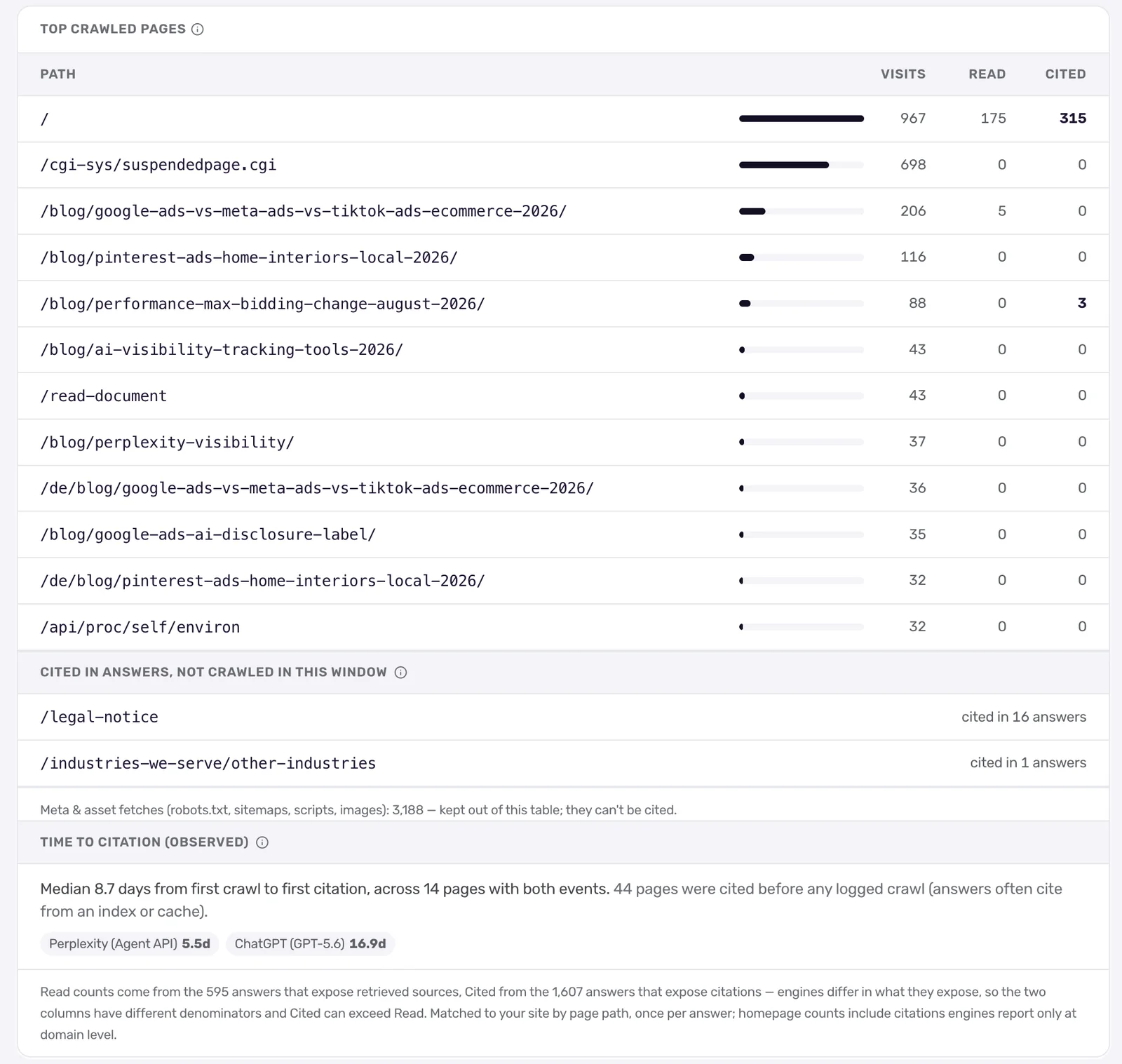
We can show both directions on pmax.online, because we also track what the engines answer. Across the 2,141 answers we tracked in the same window, the homepage was requested 967 times by AI crawlers, retrieved in 175 answers and cited in 315. The most-crawled blog post, a comparison of Google, Meta and TikTok ads, was requested 206 times, retrieved in 5 answers and cited in none. In the other direction, the legal notice page was cited in 16 answers, and no AI crawler requested it once in these 30 days.
Looking further back than the window: for the 14 pages where we have logged both a first crawl and a later first citation, the median gap is 8.7 days, and 44 pages were cited before we had ever logged a crawl of them. Being crawled is necessary at some point, and it settles nothing.
So the logs answer half of the question in the title. They tell you what the crawlers requested. To see what the engines then say you have to ask them, repeatedly, and read the sources they give: how to check if AI chatbots cite your website. And being cited is still not the same as being recommended, which is the subject of cited isn't named. For reading the log as a whole, beyond the commands, there is how to read your AI crawl logs.
The same 30 days in the tool: what AI crawlers requested (Visits) next to how often our tracked AI answers retrieved (Read) and cited each page. The most-crawled blog post was never cited; the legal notice was cited 16 times without a single crawl.
Keeping an eye on it
A one-off command is a snapshot. What is worth watching over time is a short list: a crawler that disappears, a jump in 403s or 406s after a firewall or CDN change, a user agent you have not seen before, a rise in requests that fail the address check. Running the three commands once a month covers it for most sites. A cron job and a diff covers it better.
We built this into CrunchJunkie as Crawl Insights because we wanted the crawl log next to the answers, which is the comparison in the section above. If you only want to know whether the answer crawlers can reach you right now, the free GEO audit probes them live and needs no logs.
Frequently asked questions
Search your server or CDN access log for GPTBot in the user-agent field; analytics tools will not show it, because the crawler never runs their script. Then confirm the request's IP address is inside the range OpenAI publishes at openai.com/gptbot.json, since anyone can send that user agent. On our agency's site GPTBot made 647 of 3,315 OpenAI requests in 30 days. Half of OpenAI's requests came from ChatGPT-User, which fetches a page when a person's question needs it.
No. Analytics tools count a visit when their script runs in a browser, and most AI crawlers fetch the HTML without running any script. GA4 also excludes known bots automatically. AI crawler requests are visible in server access logs, in CDN logs and dashboards such as Cloudflare's AI Crawl Control, and in log exports such as Vercel log drains.
All three belong to OpenAI. GPTBot collects training data for future models. OAI-SearchBot builds the index ChatGPT search draws on. ChatGPT-User fetches a single page when a user's request needs it. Blocking GPTBot does not affect the other two. On our agency's site over 30 days ChatGPT-User made 1,656 requests, OAI-SearchBot 1,012 and GPTBot 647.
Compare the request's IP address with the ranges the operator publishes. OpenAI, Perplexity and Google publish theirs as JSON files, and a request from outside the range is not from them, whatever its user agent says. In 30 days of logs from our agency's site, 1,232 of 4,661 checkable AI crawler requests, 26.4%, came from outside the published ranges. For operators that publish no range file, a request cannot be verified either way.
No. A log entry shows that a page was requested. Whether an assistant later uses or cites it is a separate question, and assistants often answer from an index built earlier. On our agency's site the most-crawled blog post was requested 206 times by AI crawlers in 30 days, retrieved in 5 of the 2,141 AI answers we tracked over the same period and cited in none. A page no crawler requested in that time was cited in 16.