Search Console's Generative AI report: what it shows, and the four questions it can't answer
Since 31 August 2026 every site in Search Console has a Generative AI performance report. It tells you how often links to your pages appeared in Google's AI Overviews and AI Mode, and which pages earned those appearances. That is genuinely useful and it is free. It is also narrower than most people assume: it covers Google's AI surfaces and nothing else, it counts appearances rather than recommendations, and an empty report is not proof that you are invisible. This piece sets out exactly what the report answers, the three ways it gets misread, the four questions it structurally cannot answer, and the order to check things in — free tools first.
By Philipp Enders·Founder, CrunchJunkie·LinkedInBuilds the reporting and AI-visibility tooling this analysis was run with.
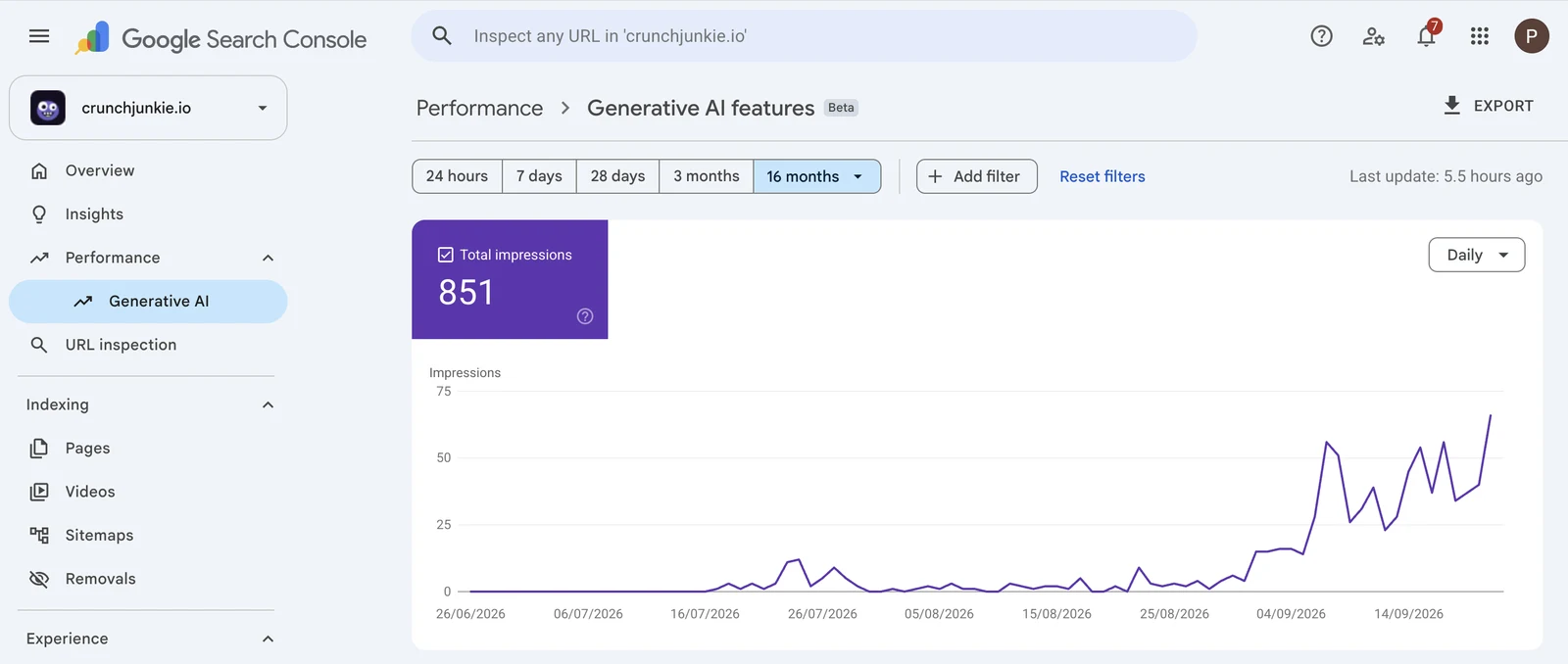
Where the report lives, and what a small one looks like: 851 impressions across the whole range, flat near zero until late August, then a climb through September. A report this size is easy to mistake for nothing at all.
What the report actually shows
Google's documentation is unusually plain about the scope. The report shows, in Google's words, "how your site performs in generative AI features on Google Search" — organic impressions over time, your top-performing pages, and impressions broken down by device or country.
Two surfaces are in scope: AI Overviews and AI Mode. The data comes from the Web search type in the Performance report, so it sits alongside the numbers you already read rather than replacing them. Google notes: "As of August 31, 2026, we've rolled out these insights to all websites worldwide."
What is out of scope is stated just as plainly. Search Console "doesn't include data from experiments in Search Labs, as these experiments are still in active development", and Discover has its own separate report. Google also names two reasons your site may show nothing at all: you have excluded your site from Search generative AI features, or it "hasn't received enough impressions in generative AI features on Google Search".
Read that last line carefully, because it is the difference between a measurement and a conclusion. A blank report means Google has not recorded enough impressions to show you. It does not mean nobody is being shown.
Three ways to misread it
An impression is an appearance, not an endorsement. The report counts times a link to your site appeared in a generative AI feature. It does not tell you what the answer said about you, whether your brand was named in the prose, or whether you were the recommendation or the counterexample. A page can be linked underneath an answer that recommends somebody else.
It is a Google report, about Google. AI Overviews and AI Mode are two surfaces among many. Nothing in this report knows what ChatGPT, Claude, Perplexity or Microsoft Copilot said about you this morning. If your buyers research in an assistant rather than in a search box, this report is silent on most of their journey.
An empty report is ambiguous by design. Google gives two documented reasons for no data, and only one of them is about your visibility. Treating a blank screen as a zero is the single most common error we see, and it is the same mistake as reading a tool's missing data as a measured zero.
The four questions it can't answer
These are not criticisms of the report. They are structural: the report is built from Google's own serving logs, so it can only know what Google served.
Did the other assistants name you? Google's report covers Google's surfaces. ChatGPT, Claude, Perplexity and Copilot each compose answers from their own retrieval, and none of it passes through Search Console.
Were you named without being linked? Being cited and being named are different wins. An answer can recommend you by name in the prose without linking you, which earns you the buyer and no impression anywhere. It can also link you as a source while recommending a competitor in the sentence above. An impressions report cannot separate those two, and they call for opposite fixes.
What did the assistant search before it answered? Most assistants run their own web searches first, and several expose them. Over the 90 days to 23 September 2026 we captured this on our own brand's prompts: 427 answers, of which 323 exposed the searches they ran — 521 distinct searches in total. ChatGPT, Claude and Gemini expose theirs; AI Overviews, AI Mode and Perplexity do not. Reading them is uncomfortable and useful in equal measure, because they are the questions the machine thinks it needs answered, in its own words.
Who was recommended instead of you? The report has no competitive dimension. It cannot tell you that a particular answer named three rivals and not you, which is the number that actually moves a pipeline.
What the searches reveal that an impressions report cannot
Two patterns in those 521 searches are worth knowing about, because they change what you should publish.
The engines go to primary sources. 115 of the 521 searches used a site: operator to look a specific domain up directly. The hosts they looked up most were semrush.com (16 searches), tryprofound.com (15), support.google.com (10), openai.com (9), developers.google.com and profound.com (7 each) and ahrefs.com (6). Roughly half of those lookups are vendors' own sites and the rest are platform documentation. When an assistant wants a fact about a product or a platform, it goes to the owner of that fact.
They ask for the official version, and they ask for a recent one. Across those searches the word the engines added most often after the obvious category terms was "official" — on 92 of them. A year token appeared on 73. The practical reading is that a dated, first-party page stating your own facts plainly is not a nice-to-have; it is the artefact the retrieval step is looking for.
There is one number we will not give you, because it does not exist: how often a human actually types any of these prompts. Nobody has that ground truth for AI assistants, and any tool that quotes you an "AI search volume" is modelling it. Treat those figures the way you would treat an invented statistic.
The domains the engines looked up directly with a site: operator, across 115 of 521 captured searches, 90 days to 23 September 2026. Vendor sites and platform documentation, in both cases the owner of the fact.
Domain looked up
Searches
semrush.com
16
tryprofound.com
15
support.google.com
10
openai.com
9
developers.google.com
7
profound.com
7
ahrefs.com
6
help.openai.com
5
peec.ai
5
profound.co
5
The domains the engines looked up directly with a site: operator, across 115 of 521 captured searches, 90 days to 23 September 2026. Vendor sites and platform documentation, in both cases the owner of the fact.
Check things in this order — the free ones first
Read the Generative AI performance report. It is free, it is first-party, and it is the only place you will see your own impressions in AI Overviews and AI Mode. Note the caveats above before you draw a conclusion from a small number.
Identify AI referrals in GA4. GA4 records the referring source of every session, and assistants send traffic from their own hosts — chatgpt.com, chat.openai.com, perplexity.ai, gemini.google.com, copilot.microsoft.com, claude.ai and a handful of others. Filtering acquisition by those sources costs nothing, needs no tags, and tells you what arrived rather than what appeared.
Read your server logs for AI crawlers. Whether a crawler fetched a page is a different fact from whether an answer cited it. Access is not citation, and conflating the two will flatter you.
Then, and only then, check the answers themselves. Ask the assistants your buyers' questions and read what comes back. Do it more than once: the same prompt does not return the same answer twice, which is why a single check is closer to an anecdote than a measurement.
The first three are free and take an afternoon. Most sites have never done them, which makes the fourth step easier to justify once you get there.
What each free source measures, and the question it leaves open. All four are available without buying anything.
Source
What it measures
What it cannot tell you
Search Console — Generative AI report
Impressions of links to your pages in Google's AI Overviews and AI Mode, plus your top pages, by device and country
Anything outside Google's AI surfaces; whether the answer named you; who was recommended instead
GA4 — acquisition by source
Sessions and conversions that arrived from assistant hosts such as chatgpt.com, perplexity.ai or claude.ai
Anything an answer did that did not end in a click — which is most of it
Server logs
Which AI crawlers fetched which pages, and when
Whether any answer ever cited the page. A fetch is access, not a citation
Asking the assistants yourself
What an answer actually says about your category today, in its own words
Whether the answer is typical. One run is an anecdote; answers vary between runs
What each free source measures, and the question it leaves open. All four are available without buying anything.
Where a tool earns its place, and where it doesn't
A tool is worth paying for when the thing you need is repetition and comparison, because those are what a person cannot do by hand. Running the same prompts across several engines on a schedule, keeping the sample size visible so a rate means something, and tracking the competitor set alongside your own brand is tedious, and tedium is what software is for. We build one, so read that as an interested party rather than a neutral one.
A tool cannot give you prompt volume, and should not pretend to. It cannot tell you why an engine chose a source. And it will not fix the underlying problem if the answer is that the pages the engines read do not mention you — that is a publishing and a distribution problem, and the measurement only tells you where to point it.
The honest sequence is: read your own free data first, decide whether the gap is real, and buy measurement when the manual version stops scaling.
Frequently asked questions
It is a Search Console report showing how often links to your site appeared in Google's generative AI features — AI Overviews and AI Mode — with impressions over time, your top-performing pages, and a breakdown by device or country. Google rolled it out to all websites worldwide on 31 August 2026.
No. It covers Google's own AI surfaces only. ChatGPT, Claude, Perplexity and Microsoft Copilot compose their answers from their own retrieval and report nothing to Search Console, so their citations never appear there.
Not necessarily. Google documents two reasons for no data: the site has been excluded from Search generative AI features, or it has not received enough impressions in those features to be shown. A blank report means Google has not recorded enough impressions to display, which is not the same as a measured zero.
No. An impression counts an appearance of a link to your site. It does not record whether the answer named your brand in the prose, whether it recommended you or a competitor, or whether the reader ever clicked. Being cited and being named are separate outcomes and they need different fixes.
In GA4, filter acquisition by session source for the hosts assistants refer from — chatgpt.com, chat.openai.com, perplexity.ai, gemini.google.com, copilot.microsoft.com and claude.ai among others. GA4 already records the referrer, so this needs no tags or extra tracking, and it measures arrivals rather than appearances.
No. There is no published ground truth for how often a prompt is typed into an AI assistant. Any number presented as AI search volume is a model or an estimate, and should be treated as one.